


BitPlanera: BTC Cloud Mining
3.818.00 Reviews
App Specs
- Version
- 3.10.2
- Updated On
- License
- Free
- Downloads
- 50,000+
- Developer
- YL Innovation
- Categories
- Finance
- Platform
- Android
Screenshots

 Analysis by AppCompare
When I look at a cloud-mining app, I start with a practical question: am I trying to learn how Bitcoin mining is presented, or am I hoping to make dependable income? Those are very different goals. BitPlanera: BTC Cloud Mining is aimed at people who want to explore a mining-style service from a phone rather than manage physical equipment. I’d approach it as a way to examine that workflow, not as a shortcut to guaranteed returns.
Start with the decision, not the plan
Before creating an account or choosing anything that involves money, I’d decide what I want to get from the app. If I’m curious about the language and routine of cloud mining, I can take time to understand the interface and its terms. If I’m looking for a predictable way to save or grow money, I’d compare it with simpler financial tools first. Bitcoin prices move, and a mining arrangement adds its own uncertainties on top of that volatility.
That distinction matters because an easy-to-use screen can make a complicated financial decision feel simple. I try not to treat a dashboard, a progress indicator, or a displayed balance as proof of profit. I’d want to know what each figure represents, when it can change, and what conditions apply before deciding whether to commit funds. A careful pause at the beginning is more useful than rushing into a plan and trying to interpret the details afterward.
A Fresh Take on Bitcoin Mining
First off, BitPlanera aims to simplify the entire BTC mining process. Instead of dealing with noisy hardware or skyrocketing electricity bills, this app offers a cloud-based solution. Essentially, it lets you mine Bitcoin via their cloud services, which is super convenient if you ask me.
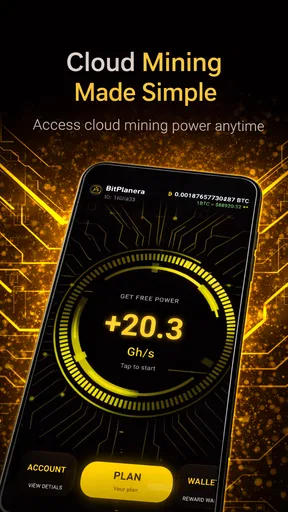
The app's interface is slick and user-friendly. Even if you're a newbie in the crypto world, you'll find it easy to navigate. From setting up your account to tracking your mining progress, everything is laid out in a straightforward manner. Plus, there’s a neat dashboard that shows real-time updates on your mining activities and earnings.
Key Features to Explore
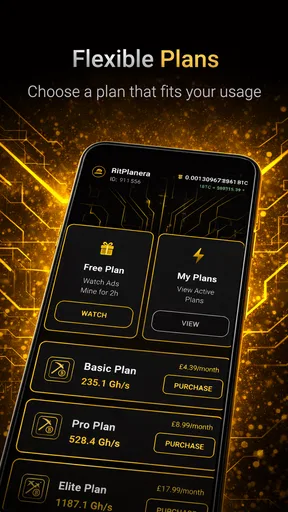
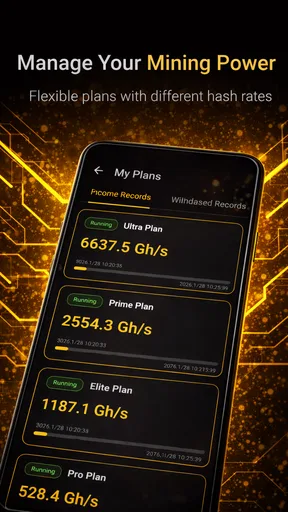
One of the standout features is their tiered mining plans. You get to choose from different packages based on how much you're willing to invest. Whether you're just testing the waters with a basic plan or going all-in with a premium option, there's something for everyone.
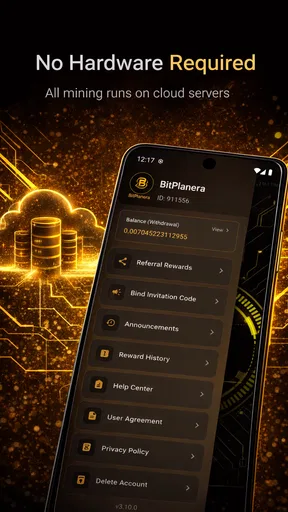
Another cool feature is the referral program. It's pretty standard in the mining app world, but it’s always nice to have that added incentive. By inviting friends, you can earn extra credits, which can boost your mining power.
Worth Reading Before You Choose

Flipboard Shows What News Apps Must Do Beyond the Feed

Switching to Android Auto Means Rethinking Your Driving Routine

Google Calendar Makes a Crowded Week Easier to Manage

Ludo King Makes the Most of the Minutes Between Plans

Baby Panda World Brings Quick Play to Modern Phones, but Its Game Library Feels Busy

ESPN’s Live Game View Makes Following Close Games Easier
Security is also a big deal for them. The app uses advanced encryption to protect your data, and they have a two-factor authentication option for added security. It’s reassuring to know that they’re taking steps to keep your investments safe.
Follow the money from choice to outcome
The most useful way to test the flow is to treat each step as a separate decision. I’d first review the available plan descriptions, then compare their terms rather than choosing by the largest-looking headline figure. I’d note what I’m paying for, whether the plan has conditions that affect the result, and how the app describes any credits or earnings. If a detail changes what I might receive or withdraw, I’d want to understand it before moving forward.
After that, I’d keep a simple record outside the app: the date I started, the amount I committed, and the figures the dashboard displays over time. This isn’t busywork. It gives me a way to distinguish a changing on-screen estimate from a realized outcome and makes it easier to notice if a plan’s terms or status need attention. I would avoid using a referral credit as a reason to spend more; it should be treated as a separate incentive, not as evidence that a plan is profitable.
A realistic routine might be checking the dashboard briefly after work, noting whether the displayed progress has changed, and then closing the app instead of watching it throughout the day. That keeps the service in perspective. Mining results and Bitcoin values are not made more reliable by frequent checking, and a screen that updates often can encourage more attention than the decision deserves.
Where the handoffs need care
Cloud mining shifts the work away from a personal mining rig, but it also means the user relies on the service’s own process and explanations. That is the key handoff: I’m not inspecting equipment or controlling its operation, so I need to understand what the app says I’m buying and how it presents the outcome. The convenience is real, but it comes with less direct control than running hardware myself.
I’d also separate account security from investment risk. Two-factor authentication can help protect access to an account, and encryption is reassuring for handling data, but neither guarantees that a mining plan will earn money or remove market risk. I’d use a unique password, enable the extra sign-in protection if available, and be cautious about sharing account details or relying on messages from people I meet through a referral offer.
The app is free to download, but that does not mean every part of using it is free. Its in-app purchases range from $4.99 to $299.99 per item, so I’d review the purchase screen carefully and avoid tapping through on the assumption that a plan is a no-cost trial. If I’m only learning, I’d stay within options that do not require a commitment until I understand the costs and conditions.
Who will get the most from it
I can see the appeal for a curious beginner who wants to become familiar with the vocabulary and basic rhythm of a cloud-mining service without setting up a computer, buying specialized equipment, or managing power use at home. The phone-based format makes it easier to check activity during a spare moment, and the guided start described in the app can make the first steps feel less intimidating.
It is a weaker fit for someone who needs a clear, low-risk place for emergency savings, wants a guaranteed return, or cannot afford to lose the money they put into a volatile activity. I’d also steer away if I wanted hands-on control over mining hardware or detailed technical monitoring; a cloud service necessarily puts more of the operation on the provider’s side. For those goals, a conventional budgeting or savings tool—or researching self-hosted mining separately—would be a more suitable starting point.
Compared with a standard crypto exchange, a cloud-mining app frames the experience around a mining plan and its progress rather than simply buying and selling coins. An exchange may be easier to understand if my aim is to hold or trade Bitcoin, though that brings its own price risk and fees. Compared with owning mining equipment, this app removes the physical setup and household power burden, but I give up direct oversight. The right choice depends on whether convenience or control matters more to me.
Getting Started
Signing up is a breeze. All you need is an email address, and you’re good to go. Once you're in, you can start mining right away. The app provides a step-by-step guide for beginners, which is a thoughtful touch.
One thing to keep in mind is that, like any investment, cloud mining comes with its risks. The market is volatile, and earnings can fluctuate. However, the app does a decent job of managing expectations by providing insights and updates on market trends.
For a first session, I’d move slowly: read the account and plan information, check what any displayed figure means, and make sure I understand the payment step before confirming it. I’d also confirm the app’s version and device compatibility before relying on it; the current version is 3.10.2 and it requires Android 6.0 or later. Those details make it easier to judge whether the app will fit an older phone, while the account and plan review helps prevent a rushed purchase.
Questions about withdrawals and the timing of any payout are worth resolving before committing money, because those details affect whether a displayed result is useful to me in practice. I’d look for the applicable terms within the app and make sure I understand the route from an on-screen balance to an outcome I can actually use. If the wording is unclear, I would not assume the most favorable interpretation; I’d wait until I could make an informed choice.
What the result can—and cannot—tell you
A dashboard is most helpful when I use it as a record of activity, not a forecast. I’d compare its figures over time and check whether the app explains the difference between mining progress, credits, and money I can access. If those are presented differently, I would not combine them mentally into one “profit” number. That small habit can prevent a common misunderstanding: an increase in a displayed total is not automatically the same as a withdrawable gain.
I’d also set a personal limit before exploring paid plans. For example, I would decide in advance what amount is strictly for learning and stop there, rather than letting a higher tier or referral incentive redefine my budget. Since purchases can be substantial, this is a useful guardrail even for someone comfortable with crypto. If the app’s conditions do not fit that limit, walking away is the sensible outcome.
BitPlanera is developed by YL Innovation, and it is listed as a finance app with an Everyone age rating. It is free to install, has more than 50K installs, and its average rating is 3.8 from 346 ratings, with 16 written reviews. I take those figures as a snapshot of its audience, not proof that a mining plan is safe or profitable. The release date is Jul 19, 2025, so I’d still read current terms in the app rather than assume every experience or condition stays the same over time.
My Takeaway
Overall, my experience with BitPlanera: BTC Cloud Mining has been pretty positive. It’s an innovative approach to mining, and for those who are curious about dipping their toes into the crypto pool, it offers a convenient and user-friendly platform.
If you’re looking to explore cryptocurrency without the hassle of hardware, this app is worth giving a shot. Just remember to do your research and invest wisely. Happy mining!
My recommendation is to try it only if you’re comfortable treating cloud mining as a speculative activity and are willing to read the plan details with care. The convenience is its strongest argument; the trade-off is relying on a service rather than controlling the equipment yourself. I’d keep expectations modest, protect the account, track what I spend, and stop if the path from plan to usable result is not clear. For learning the format, it may suit you; for dependable returns or a simple place to keep savings, I’d choose another kind of financial app.
Pros
- User-friendly interface for easy navigation.
- Low entry cost for beginner miners.
- Offers multiple mining plans.
- Regular updates for improved performance.
- No hidden fees in transactions.
Cons
- Requires constant internet connection.
- Limited customer support hours.
- Ads can be intrusive at times.
- High withdrawal threshold for earnings.
- Occasional app crashes reported.
FAQs for BitPlanera: BTC Cloud Mining
What is BitPlanera: BTC Cloud Mining?
BitPlanera: BTC Cloud Mining is an app designed to simplify cryptocurrency mining for both beginners and experienced users. It offers a cloud-based platform allowing users to mine Bitcoin without needing specialized hardware. The app focuses on user-friendly interfaces and automated processes, making it accessible for anyone interested in entering the world of crypto mining.
Is BitPlanera secure to use?
Security is a primary concern for users of BitPlanera. The app employs advanced encryption and security protocols to protect your data and earnings. Additionally, it features two-factor authentication to provide an extra layer of security. Users can have peace of mind knowing their information and investments are safeguarded.
What are the main features of BitPlanera?
BitPlanera offers several key features, including real-time mining statistics, user-friendly dashboards, and automated payouts. It also provides educational resources for beginners and allows for easy withdrawal of earnings. The app supports multiple languages, ensuring accessibility for a global audience. Overall, these features make it a comprehensive tool for cloud mining.
Are there any costs associated with using BitPlanera?
Yes, while BitPlanera offers a free version with basic features, there are premium plans available for users who wish to access advanced functionalities. These premium plans generally provide faster mining speeds and higher earning potentials. Users should review the pricing and benefits of each plan to determine which best suits their needs.
Can I use BitPlanera on multiple devices?
Yes, BitPlanera is designed to be flexible and can be accessed from multiple devices. Whether you prefer using a smartphone, tablet, or desktop, the app ensures a seamless experience across platforms. This multi-device compatibility allows users to monitor their mining progress and manage their accounts from anywhere at any time.


